The NIRD RDA API
The NIRD RDA is based on CKAN that has a rich API allowing you to create datasets programmatically. To use the API you first need an account in the archive. Once you have an account, you can create an API token by clicking on your username at the top-right of your browser window. This should open your account dashboard (see Figure 1).
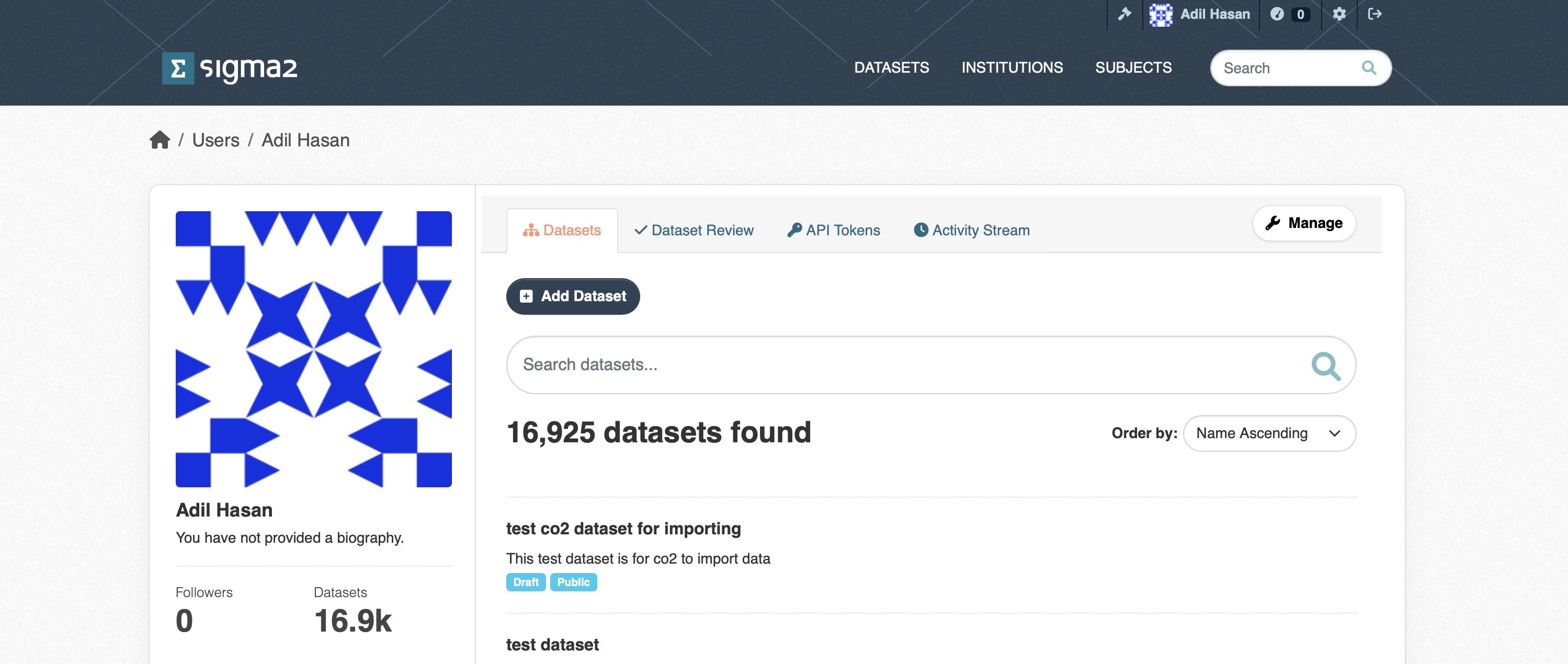
Figure 1: Screenshot of the User dashboard.
Click on the API Tokens field and type in a name for your API token in the Name field and click on the CREATE API TOKEN button.
Note: You will need to make a copy of your token somewhere safe as there is no way to recover your token if you navigate away from this page.
Throughout this document the variable $CKAN_API_ROOT refers to the archive API URL:
https://data.archive.sigma2.no/api/3/action
and your CKAN API token will be represented by the variable $CKAN_TOKEN.
Creating a dataset
To create a dataset, you will need to use the $CKAN_API_ROOT/package_create end-point. You will need to use your $CKAN_TOKEN and will need to provide a JSON document file containing the metadata describing your dataset. The metadata schema section describes the list of metadata you can provide. Only the mandatory metadata terms must be defined in your JSON document, the other terms are optional. An example using the curl command creates a dataset with the metadata supplied in the my_dataset.json JSON document:
curl -H "Authorization: $CKAN_TOKEN" -H "Content-Type: application/json" -X POST --data my_dataset.json "$CKAN_API_ROOT/package_create"
The NIRD RDA will create the dataset and return to you a JSON document containing the result of the action. If the status=success you should see a result object containing the metadata you provided to create the dataset (i.e. the metadata contained in the my_dataset.json JSON document file) as well as the unique identifier assigned to the dataset (you should see it in the value for the id term).
If the status=failure you should see reason the dataset creation failed. A common error is the dataset name (see the metadata schema section below) is not unique and is already used by an existing dataset.
Updating the metadata of a dataset
Once you have created a dataset (either via the API, or via the web interface) you can update the existing metadata, or add new metadata to the dataset. To do this, you will need to use the $CKAN_API_ROOT/package_patch end-point. You will need to use your $CKAN_TOKEN to update the dataset. You will need to supply a JSON document that contains the id term (see the metadata schema) which is the dataset unique identifier that is used by the API to identify your dataset.
The following example will update the notes metadata term for the dataset with identifier 12345678-aaaa-bbbb-cccc-123456789012
curl -X POST -H "Authorization: $CKAN_TOKEN" -H "Content-Type: application/json" -d '{"id": "12345678-aaaa-bbbb-cccc-123456789012", "notes": "This is an updated description for my dataset"}' "$CKAN_API_ROOT/package_patch"
The result returned to you will be a JSON document containing result of the update (i.e. status=success or status=failure) and the dataset metadata including your updates.
Note: The existing value of the metadata term in the archive will be replaced by the value you supply in the JSON document. This is important to remember when updating the list of creators. For example, if you wish to change the order of the list of creators, or add a new creator, you will need to supply the all the creators (even if you added them before).
Metadata schema
The following table contains the list of metadata terms that you can set or update.
Term |
Type |
Multiplicity |
Mandatory |
Description |
|---|---|---|---|---|
access_rights |
|
1 |
Y |
The access rights for the dataset in a controlled vocabulary file given below. |
conforms_to |
|
1 |
N |
The standard or specification that the dataset conforms to. |
contact_points |
|
1…n |
N |
Contact information for people that will be able to answer questions about the dataset. See the Person or Organisation table below for details on the |
contributors |
|
1…n |
N |
The contributors to the dataset (i.e. people that helped to assemble the dataset). Note: Contributors do not appear in the citation for the dataset. See the Person table below for details on the |
creators |
|
1…n |
Y |
The creators or authors of the dataset. See the Person or Organisation tables below for details on the |
dataset_owner |
|
1…n |
N |
The organisation that owns the dataset. See the DatasetOwner table below for details on the |
dataset_status |
|
1 |
N |
The controlled vocabulary for the current status of the dataset. |
embargoed_until |
|
1 |
N |
The date until which the dataset is embargoed, in ISO 8601 format. Note: **This term is only necessary for datasets when the access_rights term has the value |
groups |
|
1…n |
Y |
Used to define the subject for the dataset. See the Subject table below for details on the |
id |
|
1 |
Y* |
The unique identifier for the dataset. This identifier is needed for updating datasets and not for creating datasets. |
language |
|
1 |
Y |
Controlled vocabulary for the language of the dataset. |
license_id |
|
1 |
Y |
The ID of the license under which the dataset is published. |
name |
|
1 |
Y |
The unique identifier for the dataset (this is used in the URL path to the dataset). |
notes |
|
1 |
Y |
A description of the dataset, detailing its purpose or contents. |
project |
|
1…n |
N |
A list of projects related to the dataset. |
provenance |
|
1 |
N |
The provenance or history of the dataset in a JSON format. |
related_resources |
|
1…n |
N |
A list of related resources, see the table Related Resources below for details on the |
source |
|
1…n |
N |
The original source of the dataset, typically a URL or reference. |
spatial |
|
1 |
N |
Term describing the geographical coverage of the dataset (e.g., bounding box). See the Spatial table for information on the |
state |
|
1 |
Y |
Dataset state. A dataset must be initially created, or updated with the state |
tags |
|
1…n |
N |
A keyword or keywords that help to describe the dataset. See the Keyword table for information on the |
temporal |
|
1 |
N |
Term describing the temporal coverage of the dataset. See the Temporal table for information on the |
theme |
|
1…n |
Y |
A theme or themes that help to describe the dataset. See the Theme table for information on the |
title |
|
1 |
Y |
The title of the dataset. |
version_notes |
|
1 |
Y |
Notes describing any version changes or updates to the dataset. |
Controlled vocabularies for basic terms
The controlled vocabularies for the basic terms can be found in the following JSON files:
access_rightscontrolled vocabulary can be found in the access_rights.json JSON file.dataset_statuscontrolled vocabulary can be found in the dataset_status.json JSON file.languagecontrolled vocabulary can be found in the languages.json JSON file.license_idthe endpoint$CKAN_API_ROOT/license_listreturns a list of license metadata objects. Each object contains anidwhose value is thelicense_id.
The DatasetOwner schema
The schema for the DatasetOwner is defined in the following table.
Term |
Type |
Multiplicity |
Mandatory |
Description |
|---|---|---|---|---|
organisation |
|
1 |
Y |
The ROR identifier for the organisation. The ROR identifier should come from a controlled vocabulary (see below). |
Accessing the controlled vocabulary
The list of institutions known to the archive can be accessed using the $CKAN_API_ROOT/group_list endpoint and supplying the type=institution parameter:
curl "$CKAN_API_ROOT/group_list?type=institution".
The endpoint will return a list of Research Organization Registry (ROR) identifiers. To get the institution metadata for a given ROR ror identifier, use the endpoint $CKAN_API_ROOT/group_show?id=ror.
The institution metadata will also include the name of the institution.
The Keyword schema
A keyword consists of two components, a tag_string list of tag strings and a tags list of tag objects. The tag_string must be a list of tag names only. You can create new tags or use a pre-defined tag.
Term |
Type |
Multiplicity |
Mandatory |
Description |
|---|---|---|---|---|
tag_string |
|
1…n |
Y |
The name of the tag |
tags |
|
1…n |
Y |
The tag object which is defined in the table below. |
The Tag schema
The schema for the Tag type is defined in the table below.
Term |
Type |
Multiplicity |
Mandatory |
Description |
|---|---|---|---|---|
name |
|
1 |
Y |
The name of the tag. |
The Organisation schema
The organisation type is defined in the following table.
Term |
Type |
Multiplicity |
Mandatory |
Description |
|---|---|---|---|---|
acronym |
|
1 |
N |
The acronym for the organisation. |
contact_email |
|
1 |
Y |
The email address for the contact. person in the organisation. The email address should follow the IETF RFC 5322 standard. |
homepage_url |
|
1 |
Y |
The URL for the organisation home page. The URL should follow the IETF RFC 3986 standard. |
name |
|
1 |
Y |
The name of the organisation. |
ror |
|
1 |
N |
The Research Organisation Registry (ROR) identifier for the organisation. These can be found, if they exist, on https://ror.org |
type (creators or contact_points only) |
|
1 |
Y |
This term is only valid for the creators and contact_points terms and is the type of creators or contact_points and, in this case should have value |
The Person schema
The Person type is defined by the following schema. Note that the type term is overloaded and has a different meaning depending on the higher-level term.
Term |
Type |
Multiplicity |
Mandatory |
Description |
|---|---|---|---|---|
|
1 |
Y |
The email address of a the user. The email address should follow the IETF RFC 5322 standard. |
|
first_name |
|
1 |
Y |
The first name of a person, can also include the initial or full middle name |
last_name |
|
1 |
Y |
The last name of a person |
orcid |
|
1 |
N |
The ORCID identifier for the user. |
organisation |
|
1 |
Y |
The name of the organisation a user belongs to. The name can be chosen from the list of existing organisations, or a new one can be given. |
type (contributors term only) |
|
1 |
N |
This term is only valid for contributors terms and is the type of contributor. |
type (creators or contact_points only) |
|
1 |
Y |
This term is only valid for the creators and contact_points terms and is the type of creators or contact_points and, in this case should have value |
Finding the type for the Contributor
The list of valid types of contributor can be found in the contributor_types.json JSON file.
The Spatial schema
The spatial schema supports two types: bounding box and Well Known Text (WKT https://en.wikipedia.org/wiki/Well-known_text_representation_of_geometry).
Term |
Type |
Multiplicity |
Mandatory |
Description |
|---|---|---|---|---|
spatial_type |
|
1 |
Y |
The controlled vocabulary for the type of spatial description |
value |
|
1 |
Y |
The value for the spatial term. The schema for the |
Finding the spatial type
The controlled vocabulary for the spatial_type is in the spatial_type.json JSON file.
The BBOX schema
The BBOX type should be a list of coordinates (floats or ints) with the following convention:
[Northern-most latitude, Southern-most latitude, Eastern-most latitude, Western-most latitude]
The WKT schema
The WKT type should be a String following the WKT convention (see https://en.wikipedia.org/wiki/Well-known_text_representation_of_geometry). An example is the 2-D polygon with 4 corners, each having the x-y coordinates:
(30, 10), (40, 40), (20, 40), (10, 20), this can be represented in WKT with the string:
POLYGON ((30 10, 40 40, 20 40, 10 20, 30 10))
The Subject schema
The subject term is defined in terms of the groups term.
Term |
Type |
Multiplicity |
Mandatory |
Description |
|---|---|---|---|---|
groups |
|
1…n |
Y |
The group object which is used to define the subject. The schema for the |
The Group schema
The schema for the Group type is defined in the following table.
Term |
Type |
Multiplicity |
Mandatory |
Description |
|---|---|---|---|---|
name |
|
1 |
Y |
The subject name comes from a controlled vocabulary. |
type |
|
1 |
Y |
The type of group term. The value should always be |
Finding the subject name
The list of subjects known to the archive can be accessed using the $CKAN_API_ROOT/group_list endpoint and supplying the type=subject parameter:
curl "$CKAN_API_ROOT/group_list?type=subject"
which will return a JSON document containing the list of subject names that you can use as a value for the Group name.
The Temporal schema
The schema for the temporal coverage term is defined in the table below.
Term |
Type |
Multiplicity |
Mandatory |
Description |
|---|---|---|---|---|
end |
|
1 |
Y |
The end date of the temporal coverage. The date string should follow the standard ISO 8641 standard. |
start |
|
1 |
Y |
The start date of the temporal coverage. The date string should follow the standard ISO 8641 standard. |
The Theme schema
The schema for the theme is given in the table below.
Term |
Type |
Multiplicity |
Mandatory |
Description |
|---|---|---|---|---|
name |
|
1 |
Y |
The name of the term from the theme. The name is a controlled vocabulary and must belong to one of the existing themes. |
vocabulary_id |
|
1 |
Y |
The identifier for the theme. |
Finding the theme name and vocabulary_id
The endpoint $CKAN_API_ROOT/vocabulary_list will return a list of vocabulary objects, each with a name and identifier, the id of the vocabulary you wish to use is the vocabulary_id. To find the list of terms (tags) for a theme with vocabulary_id vocab_id, use the endpoint $CKAN_API_ROOT/vocabulary_show?id=vocab_id. For the name of the tag object in the list of tags is the Theme name.
For example, the theme metadata for the tag or keyword with the name Transport networks in the GEMET theme should be (assuming the vocabulary_id is 8f395a7a-497c-4e62-902a-44365784ab12 for the GEMET theme):
"theme": [{"name": "Transport networks", "vocabulary_id": "8f395a7a-497c-4e62-902a-44365784ab12"}].